
AI course builder · xAPI, cmi5 and standalone site export
Create engaging online courses faster with AI.
Turn your documents, web links, videos and ideas into structured, interactive e-learning in minutes. Refine the draft in a drag-and-drop editor, then export it as a standards-based xAPI or cmi5 package, publish it as a standalone course website with no LMS needed, or open it straight from any LTI 1.3 LMS. Your existing SCORM courses can come with you.
Free plan, no credit card needed. Made in Australia.
- AI generation from your own content
- 43 block types
- SCORM import
- xAPI and cmi5 export
- Standalone course sites
- LTI 1.3 LMS delivery
- WCAG 2.2 AA checks
// one decision, in full
{
  "actor":  { "name": "Priya Nair" },
  "verb":   { "display": { "en": "answered" } },
  "object": { "id": ".../scenario/scene/2",
              "interactionType": "choice" },
  "result": { "response": "report-to-warden",
              "success": true,
              "duration": "PT33S" }
}
Example data from a launched course, as your Learning Record Store (LRS) would show it.
Why teams choose it
Everything you need to build courses people finish, and learn from
Most authoring tools make you choose: fast and basic, or powerful and slow. xAPI Course Builder gives you both.
Faster development
AI turns your source material into a full draft: chapters, lessons, interactions and questions. You start by editing, not from a blank page.
Engaging learning
Scenarios, 360° virtual tours, interactive video, drag and drop, hotspots, flip cards and more, in a responsive player that works on any device.
Richer evidence
Exported courses are designed to produce detailed xAPI statements (answers, decisions, video viewing and attempts), not just a completion and a score.
Content you own
Self-contained packages that run without our app, on open standards, with learning data going to the Learning Record Store you choose.
What it is
An AI course authoring platform built on open standards
xAPI Course Builder is a web-based e-learning authoring tool. You use it to create, review and publish online courses, then export them as xAPI or cmi5 packages.
What it is
- An AI course builder and authoring studio
- A review and collaboration workspace for your learning team
- A way to bring SCORM courses into an editable, modern format
What it isn't
- It isn't an LMS. You deliver courses through your own LMS, launch service, portal or website.
- It isn't a Learning Record Store. Exported courses send learning data to the LRS your organisation chooses.
- Exported packages don't depend on it. Hosted courses for LTI 1.3 LMSs are the exception: they run from xAPI Course Builder, with tracking sent to our LRS or yours.
How AI course generation works
From source material to a structured course in four steps
Your content, your control
The AI works from the material you provide, and you approve the outline before anything is written. Every generated block can be edited, reordered or removed. Prefer your own AI provider? Use your own key.
Add your sources
Upload documents, PDFs or ZIP files, paste web links, online documents or video links, or just write a brief.
Shape the outline
Review and edit the proposed chapters and lessons before any content is written. Choose the interactions you want, including branching scenarios.
Generate the lessons
The AI writes lessons, knowledge checks and interactions from your material. "Do not change content" mode brings documents in word for word.
Edit and refine
Everything is editable in the studio. When your source changes, regenerate the course.
More about the AI course generator.
Learning experience features
Build interactive learning, not slide decks
One authoring studio for content, interactions, assessments, review and teamwork.
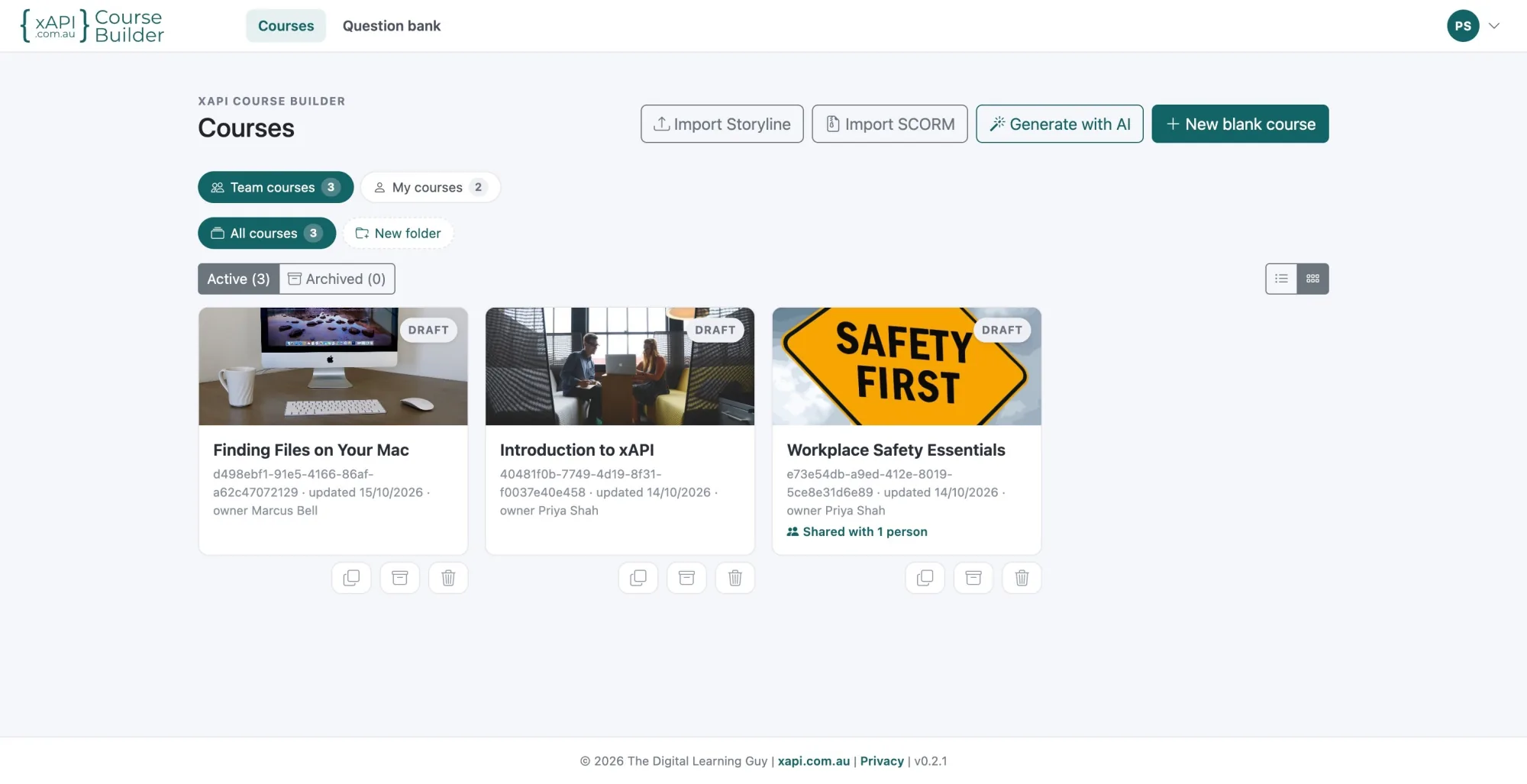
Course library
Every course you and your team are working on, in one place.
- Team courses and your own courses, side by side
- Folders, plus active and archived views
- Grid of cover-image cards or a compact list
- Draft status and who each course is shared with at a glance
- Start a course from an import, with AI or from a blank page
- Duplicate, archive or delete in one click
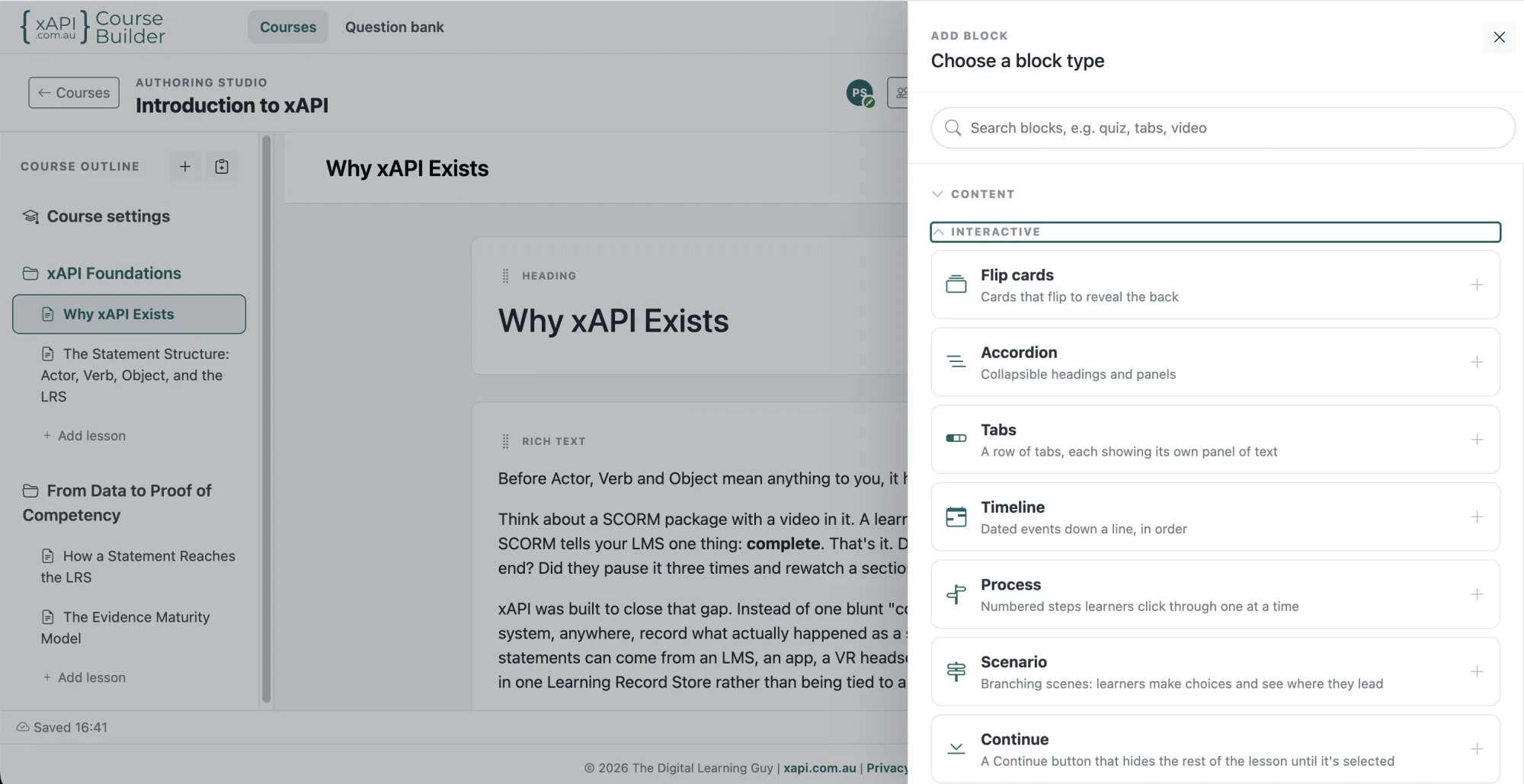
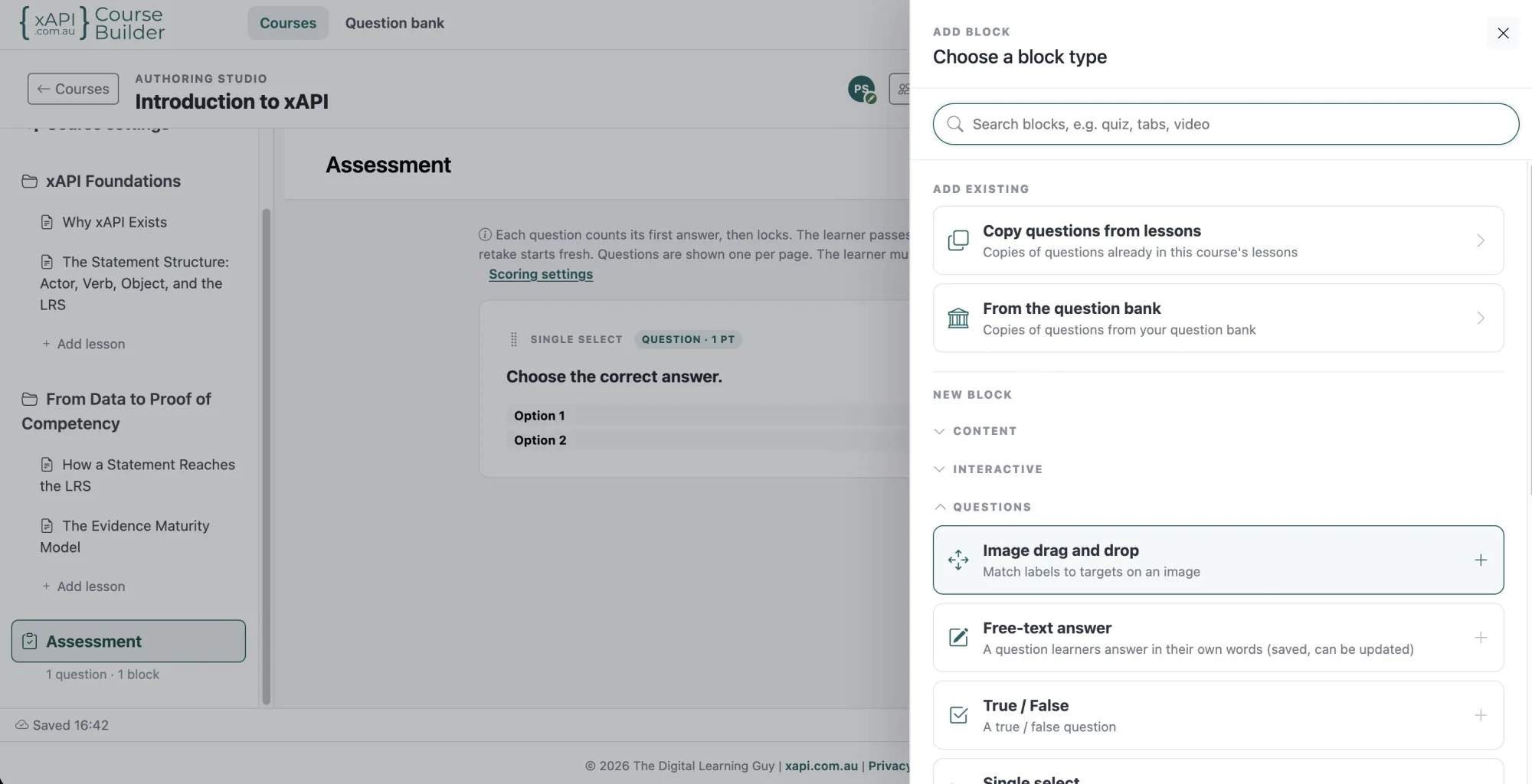
43 block types
Drag them into any lesson. Outlined blocks generate their own xAPI interaction statements when the course is launched.
Questions
Interactions
Media
Content and layout
Authoring studio
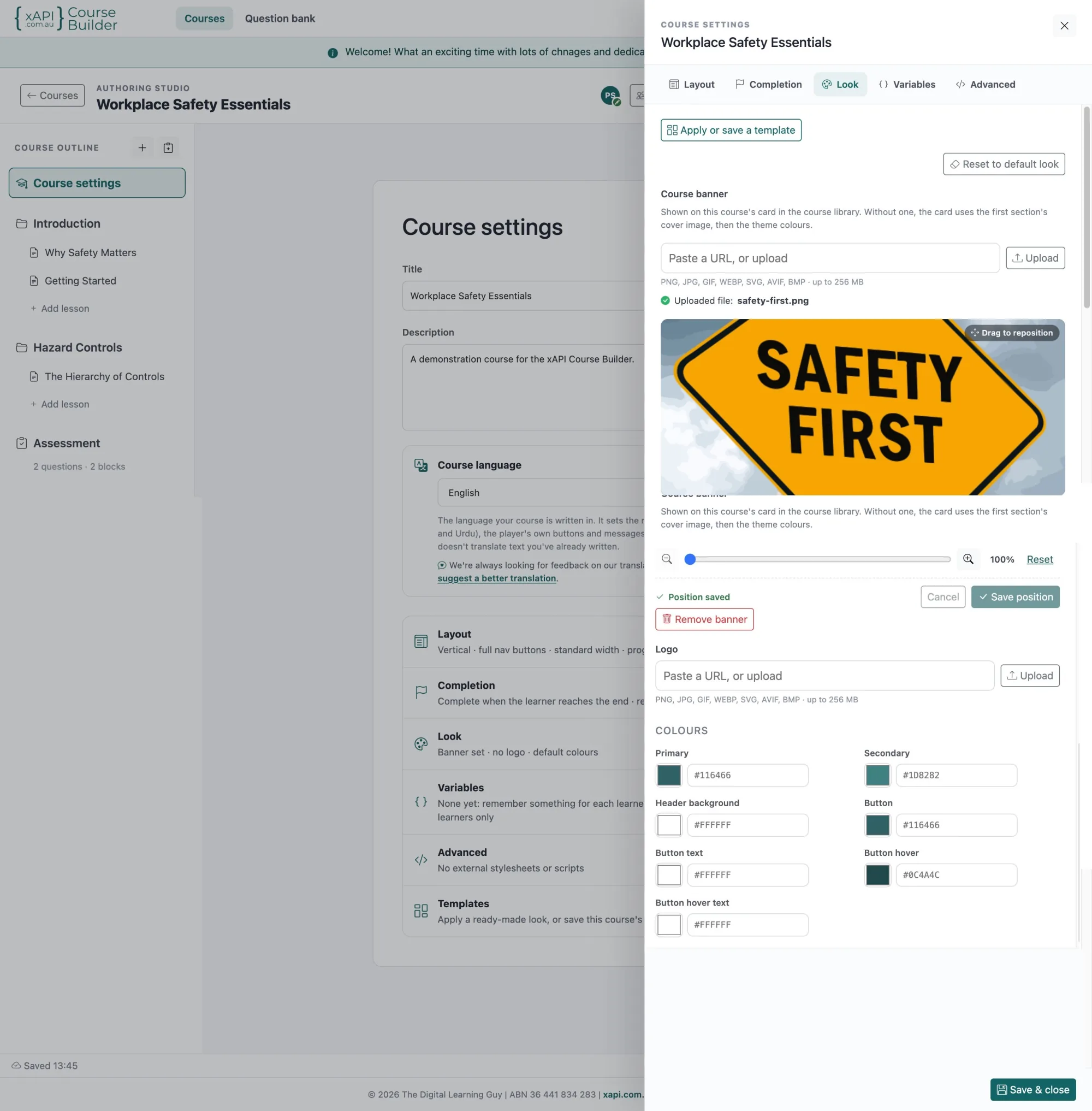
A studio that stays out of your way.
- Drag-and-drop outline for chapters, lessons and blocks
- Inline rich text editing with media shown in the canvas
- Preview at desktop, tablet or phone size, in the same player learners use
- Show xAPI Captured on any block: the statements it sends, with an example of each, plus the ones it sent while you previewed
- Two course layouts: scrolling pages or full-screen scenes
- Course themes: colours, fonts, chapter backgrounds, banners
- Optional course-logo watermark on images and video
- Published versions with history and one-click restore
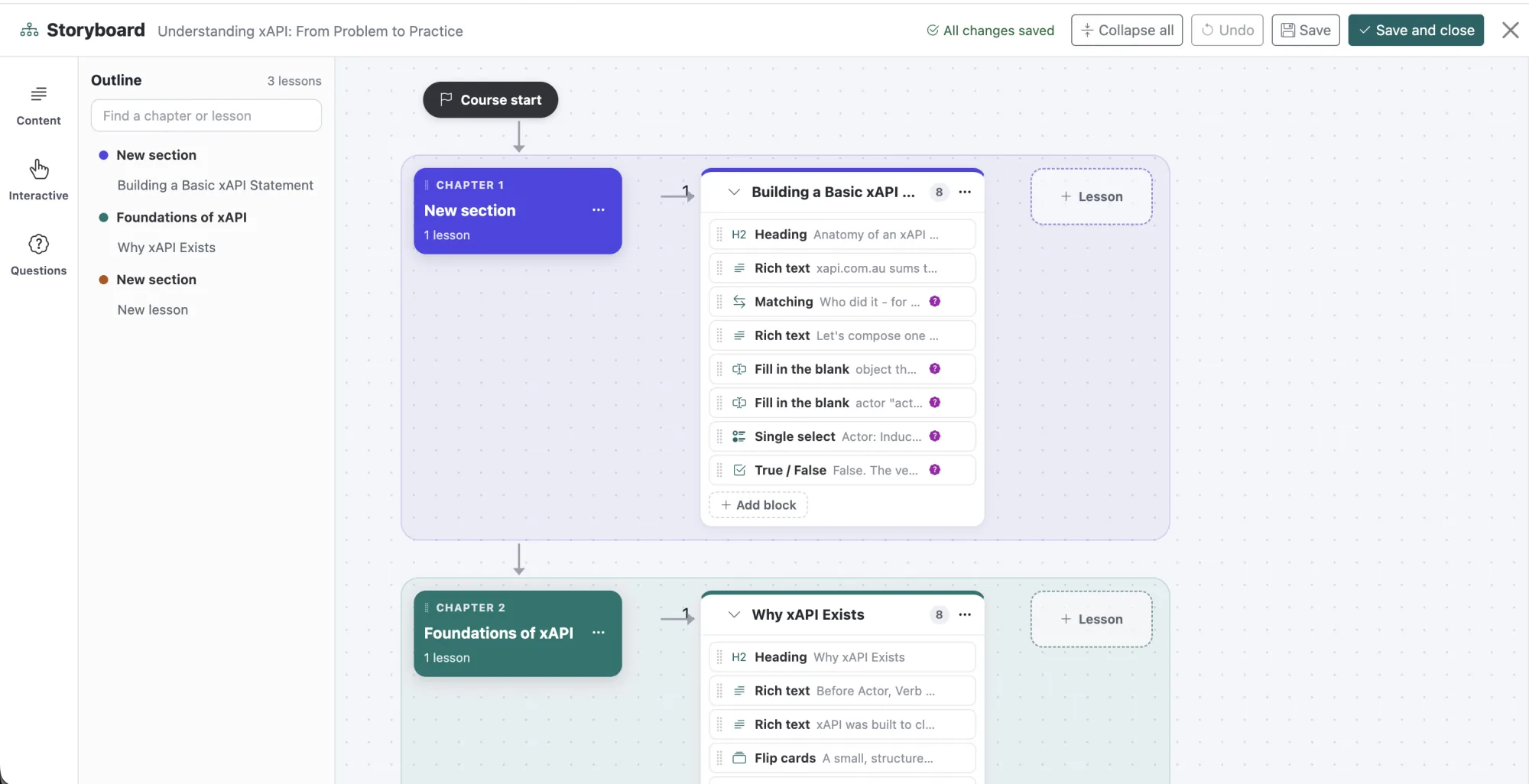
Storyboard
See the whole course as a map, and rearrange it by dragging.
- Every chapter as a lane, with its lessons as cards listing their blocks
- Arrows from course start to course end, always in the order learners go
- Drag blocks between lessons, lessons between chapters, and chapters into a new order
- Drag new content, interactive and question blocks straight onto a lesson
- Collapse everything to see a long course at once, and undo any move
- Works from the keyboard too, and saves as you go
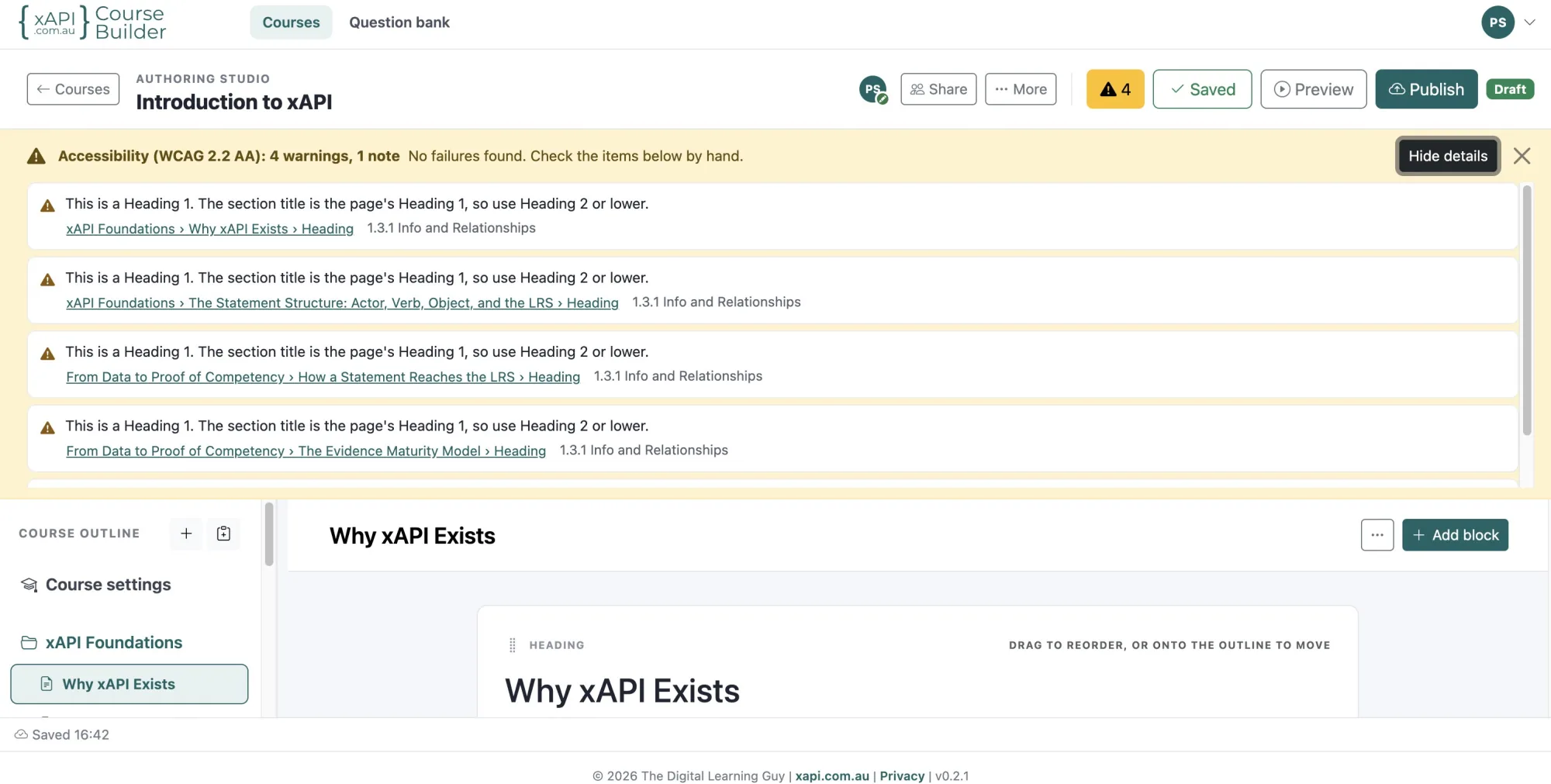
Accessibility: WCAG 2.2 AA
Accessible courses, checked as you build. The learner player is built to WCAG 2.2 AA.
- Keyboard navigation, visible focus and screen-reader announcements
- Contrast-guarded theme colours and 24px touch targets
- Feedback that doesn't rely on colour alone
- An accessibility checker that flags content issues, such as missing alt text, and links to each one
- Images can be marked decorative
Outlined generates its own xAPI interaction statements when the course is launched. Every block counts toward lesson progress and completion.
Two course layouts
Choose how learners move through a course, and switch at any time without rebuilding it.
- Scrolling pages: each chapter is a page with a cover banner, with its lessons all together or one at a time
- Full-screen scenes: every lesson fills the screen, one scene after another
- Learners move between scenes with the navigation rail, the mouse wheel, a swipe or the keyboard
- A scene's questions are answered before moving on, and a right answer shows its feedback on a card
- Give each scene its own background image or colour, with light or dark text to suit
- Pan a tall or wide picture through a chapter's scenes, for the feel of moving through one place
- Both layouts export the same way and send the same xAPI statements
Preview on any device
See the course as learners will, before you publish.
- Preview in the same player learners use
- Switch between desktop, tablet and phone sizes
- Turn a tablet or phone to landscape
- Changing size keeps the learner's place, so you can compare one screen across devices
- Back to editor opens the lesson you were previewing
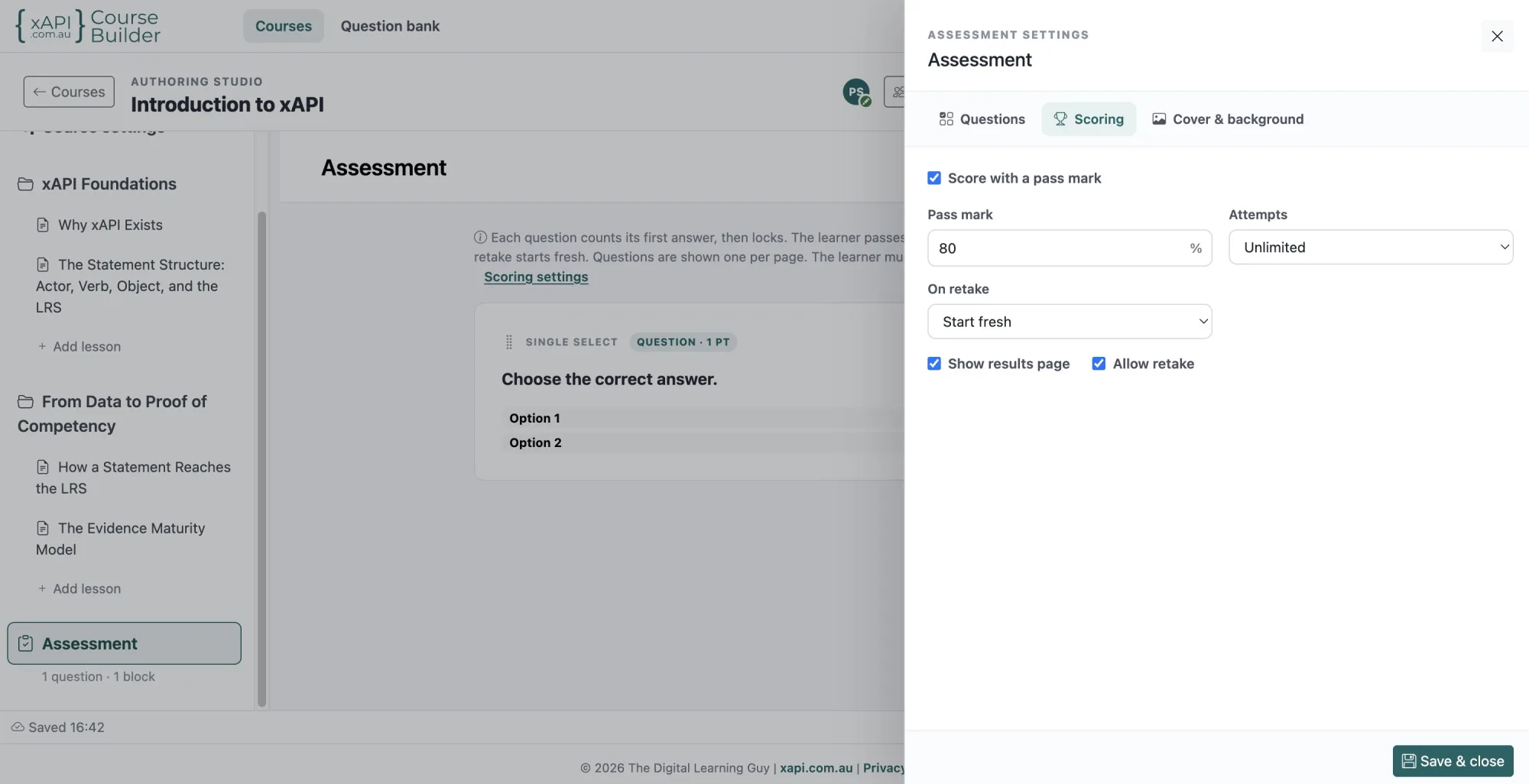
Assessments
Assessments that measure more than recall, built from questions you write once.
- A question bank: save questions once and reuse them in any course
- Import questions into the bank from QTI files exported by your LMS or item bank
- Organise the bank by category and tag; teams share one bank
- Random draws: ask a set number of questions from each category or tag, fresh every attempt
- Shuffle question order and answer options
- Retakes that start fresh or ask only the questions missed
- Pass marks, attempt limits and question weighting
- A statement for every attempt, with passed or failed and a scaled score
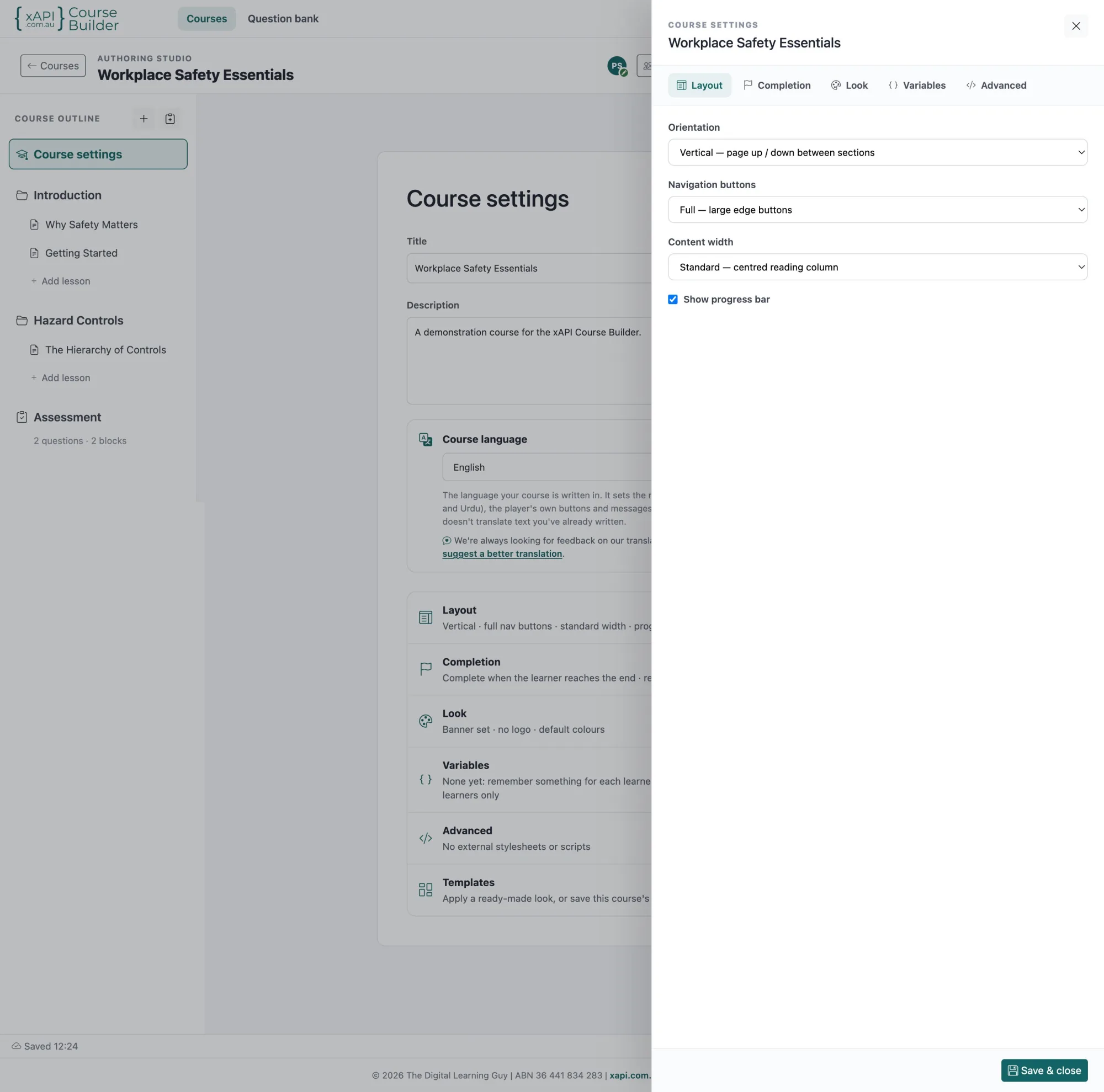
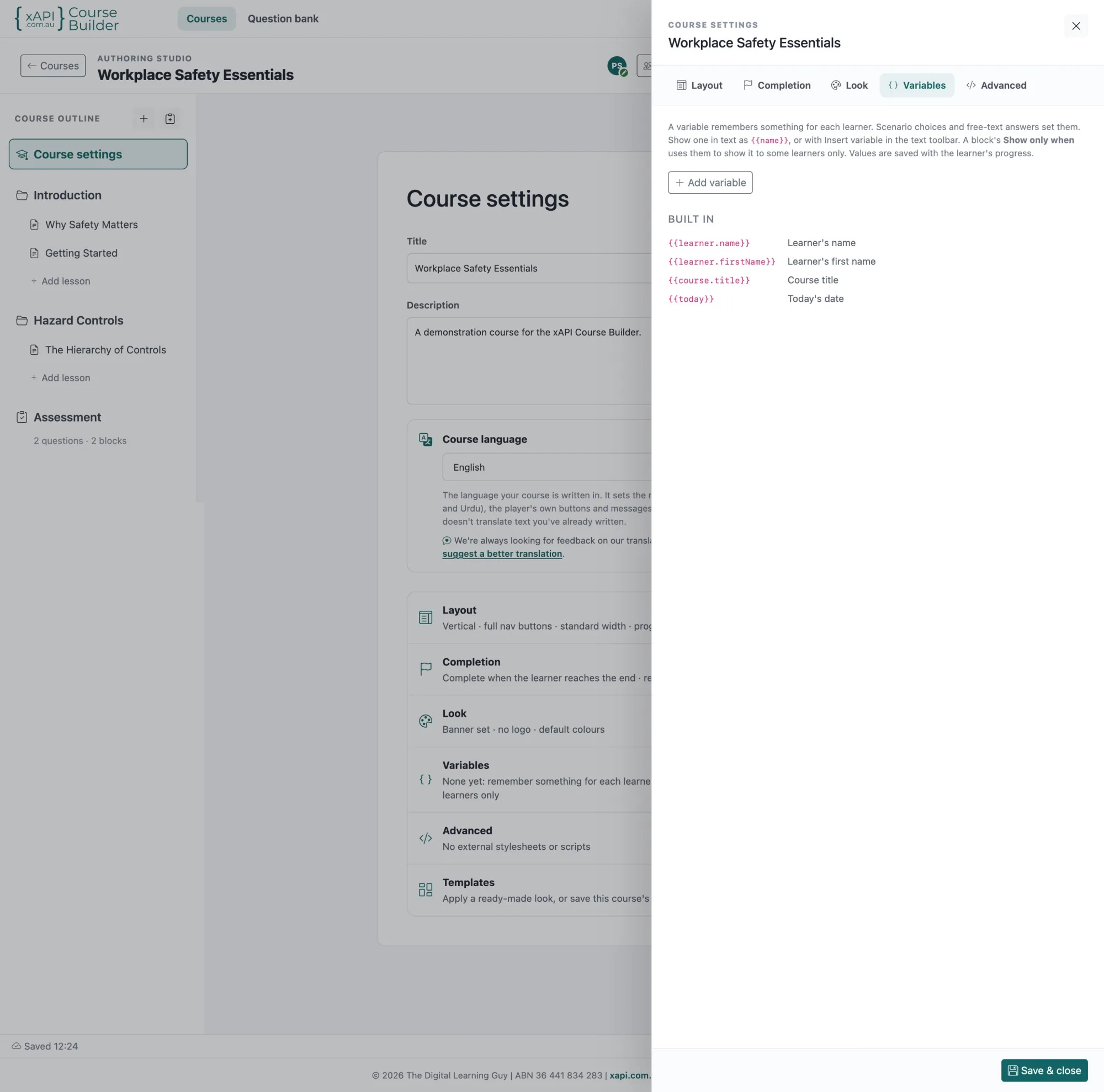
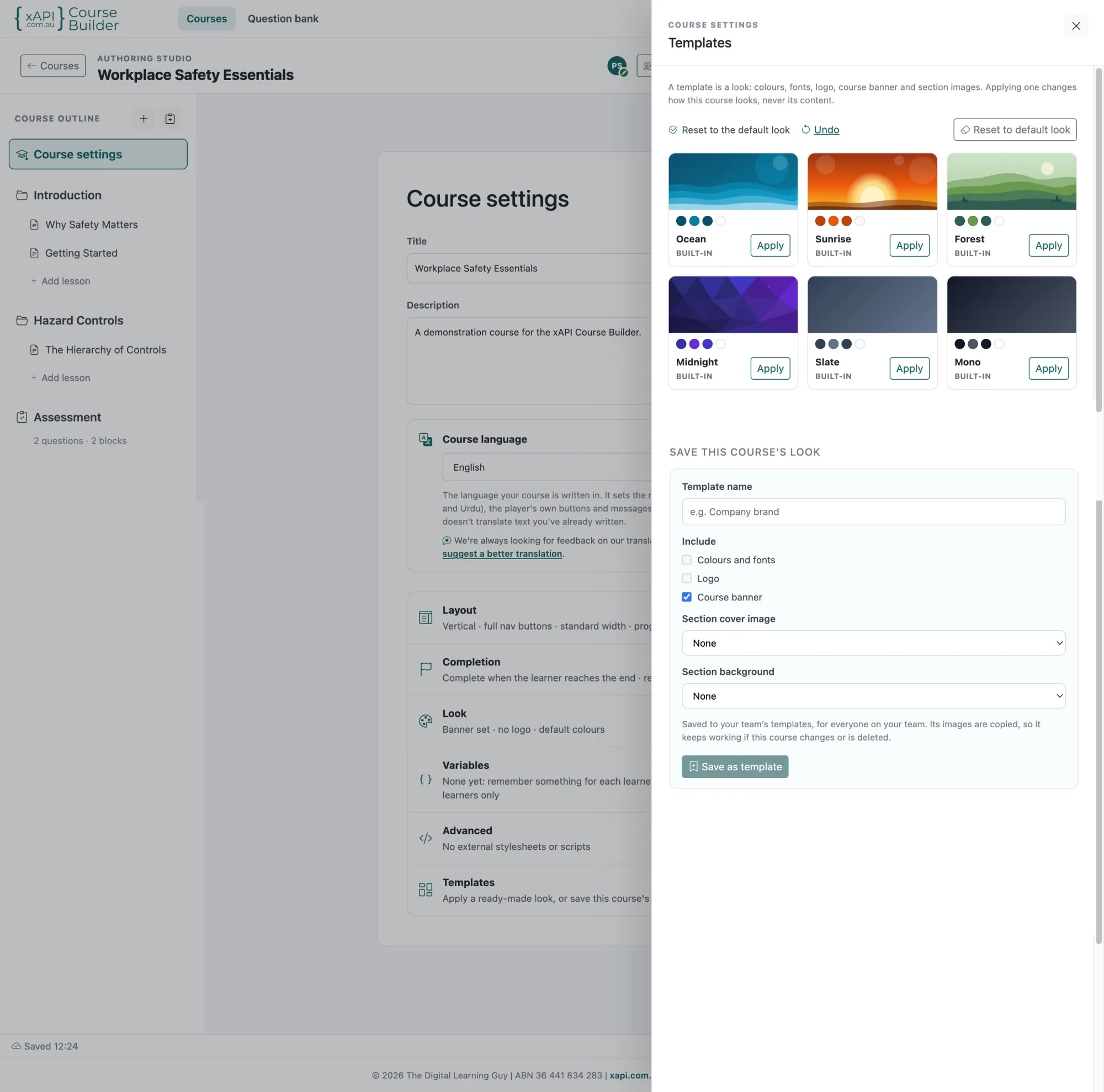
Course settings, variables and templates
Set how a course behaves, speak to each learner personally, and give every course your look.
- Layout, completion, look and advanced options, each in its own panel
- A course language that sets the player's own buttons and messages, with right-to-left layout where needed
- Greet learners by name, and show the course title or today's date anywhere in your text
- Your own variables, set by scenario choices and free-text answers and saved with each learner's progress
- "Show only when" rules that show a block to some learners only
- Six ready-made looks, or save your own colours, fonts, logo, banner and chapter images as a template
- Templates change how a course looks, never its content
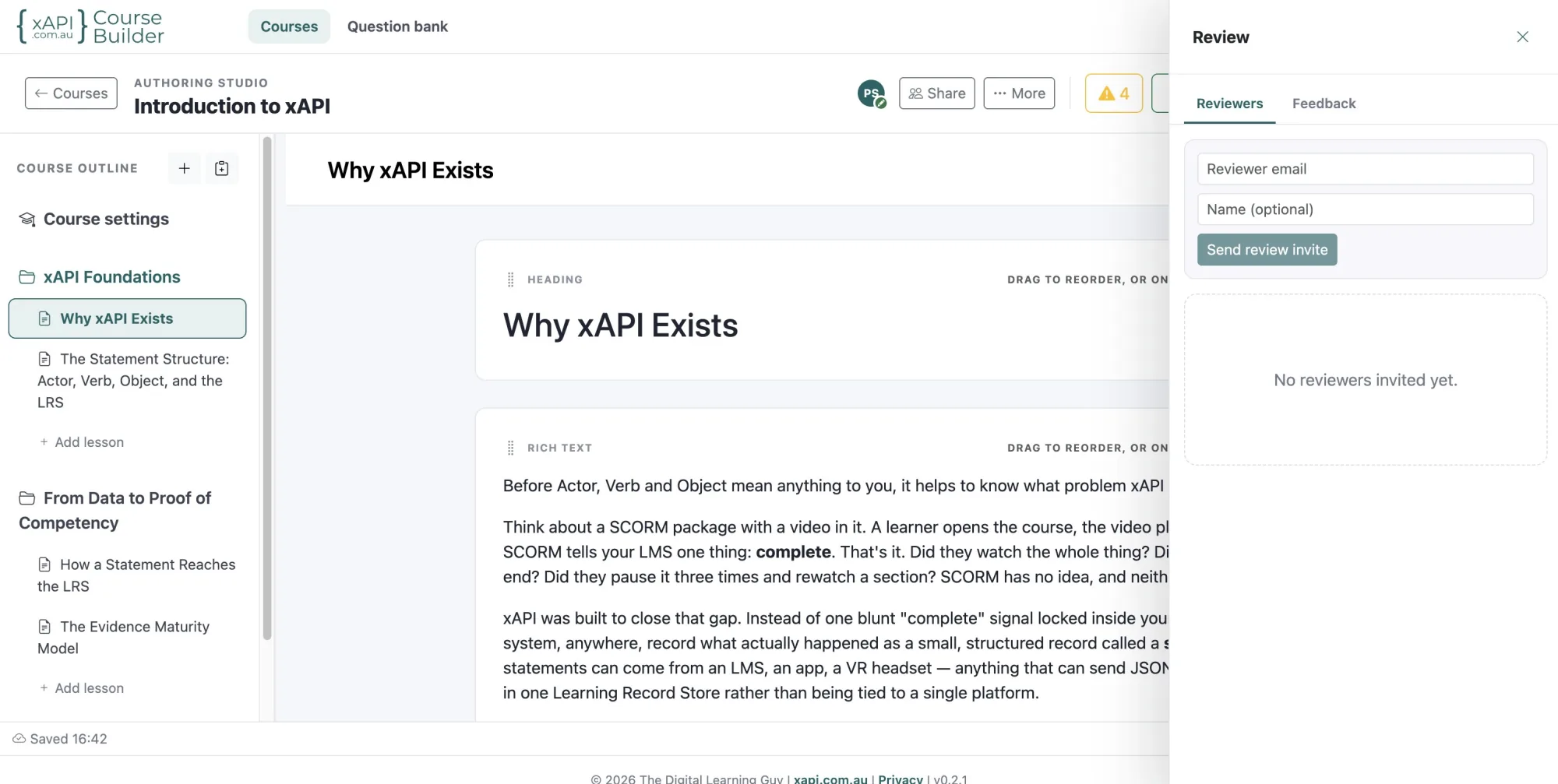
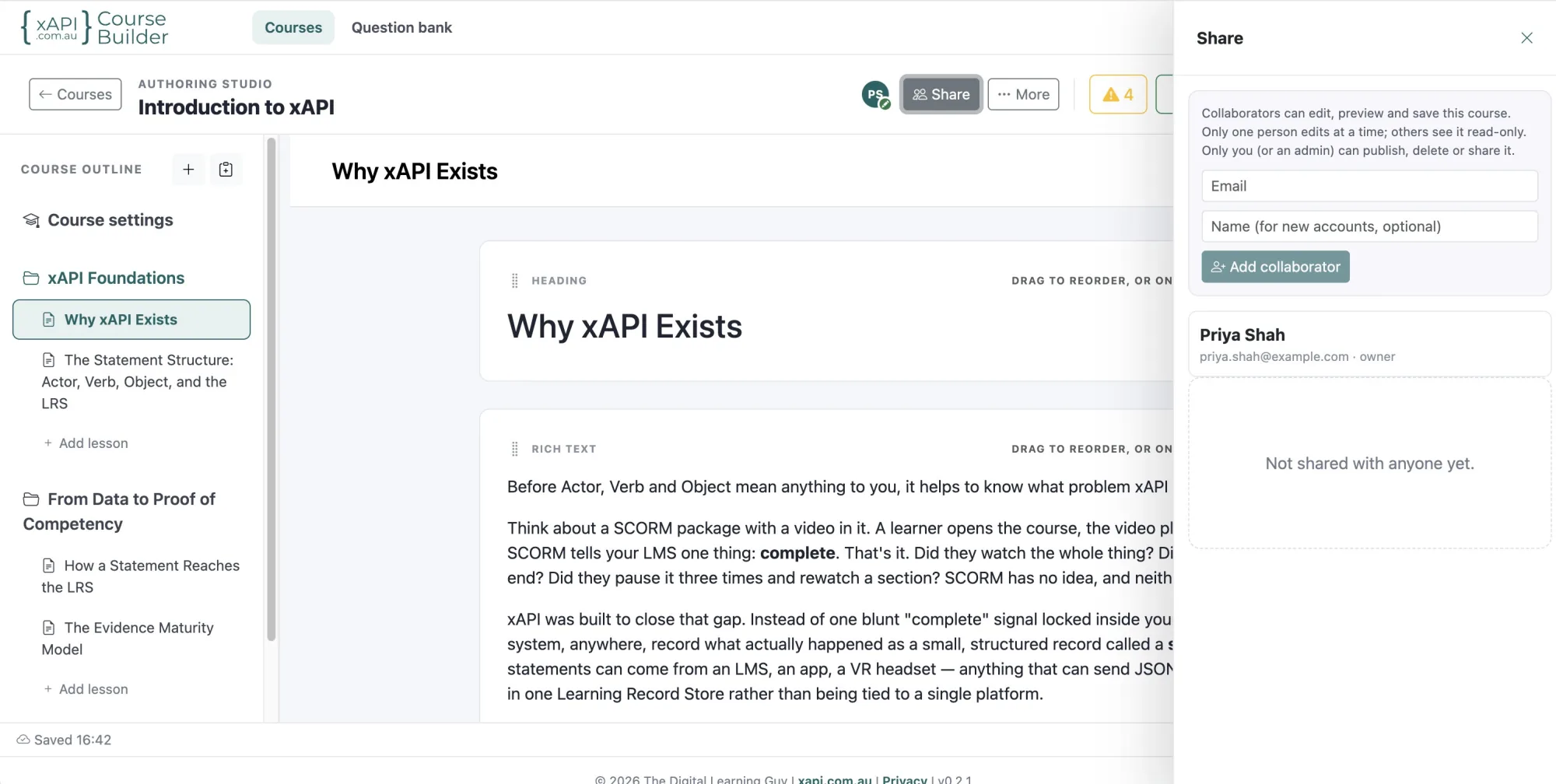
Review and collaboration
Get sign-off without emailing files around.
- Emailed reviewer links, no account needed
- Feedback pinned to a chapter or lesson, with screenshots
- Owner replies to each comment
- Share a course with co-editors by email
- Live presence and an edit lock so work isn't overwritten
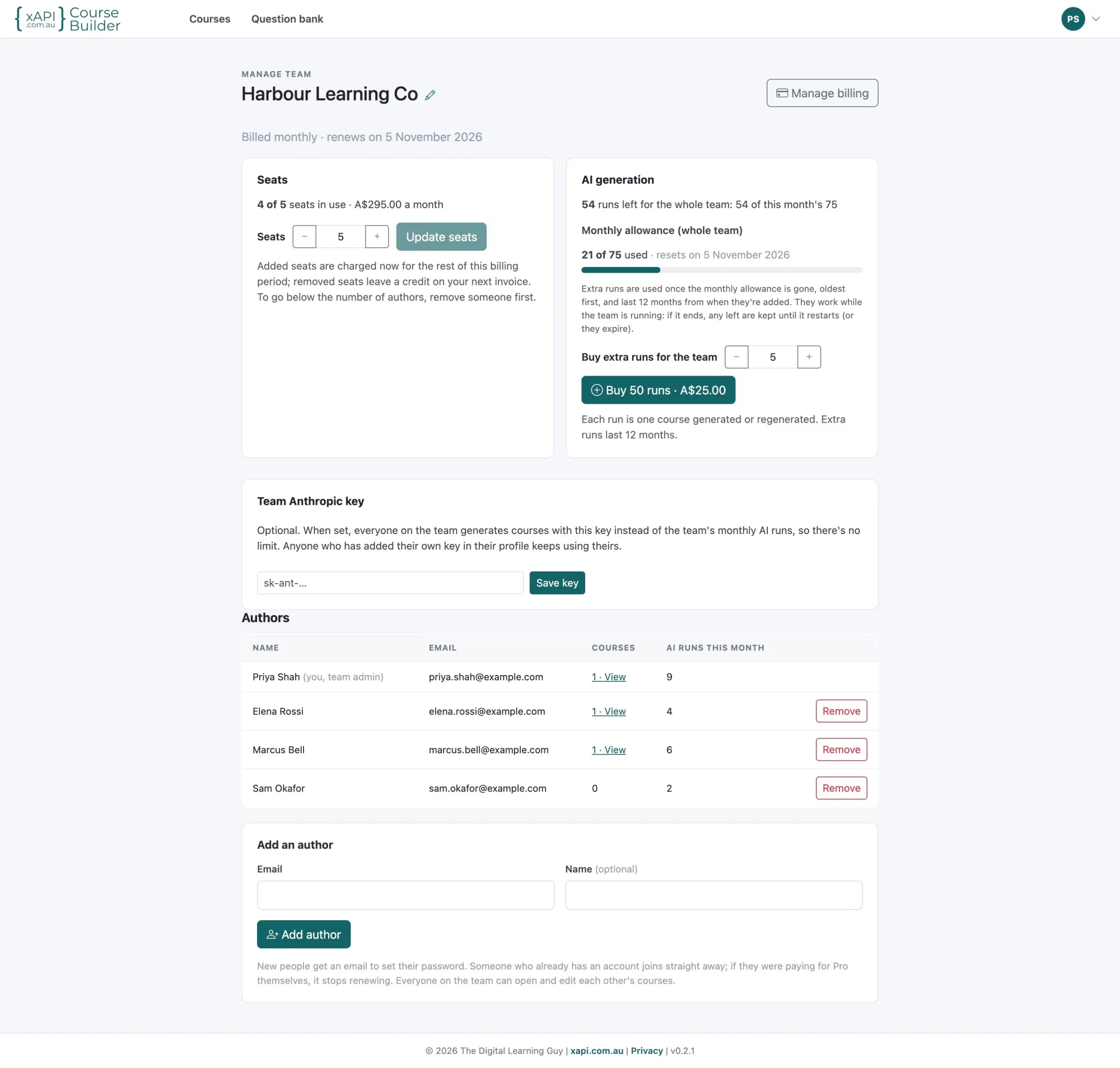
Accounts and teams
Start on your own, then bring your learning team.
- Emailed sign-in codes and "remember this device"
- Team workspaces: add authors and manage it all yourself
- A shared question bank and pooled AI generation runs
- Your courses stay yours: publish and export any time
SCORM migration
Move your SCORM courses to xAPI without rebuilding them
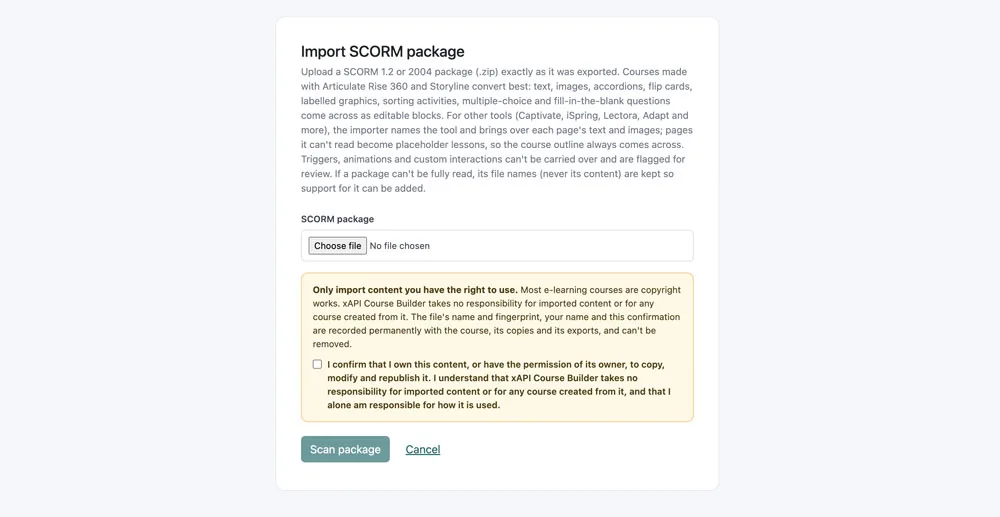
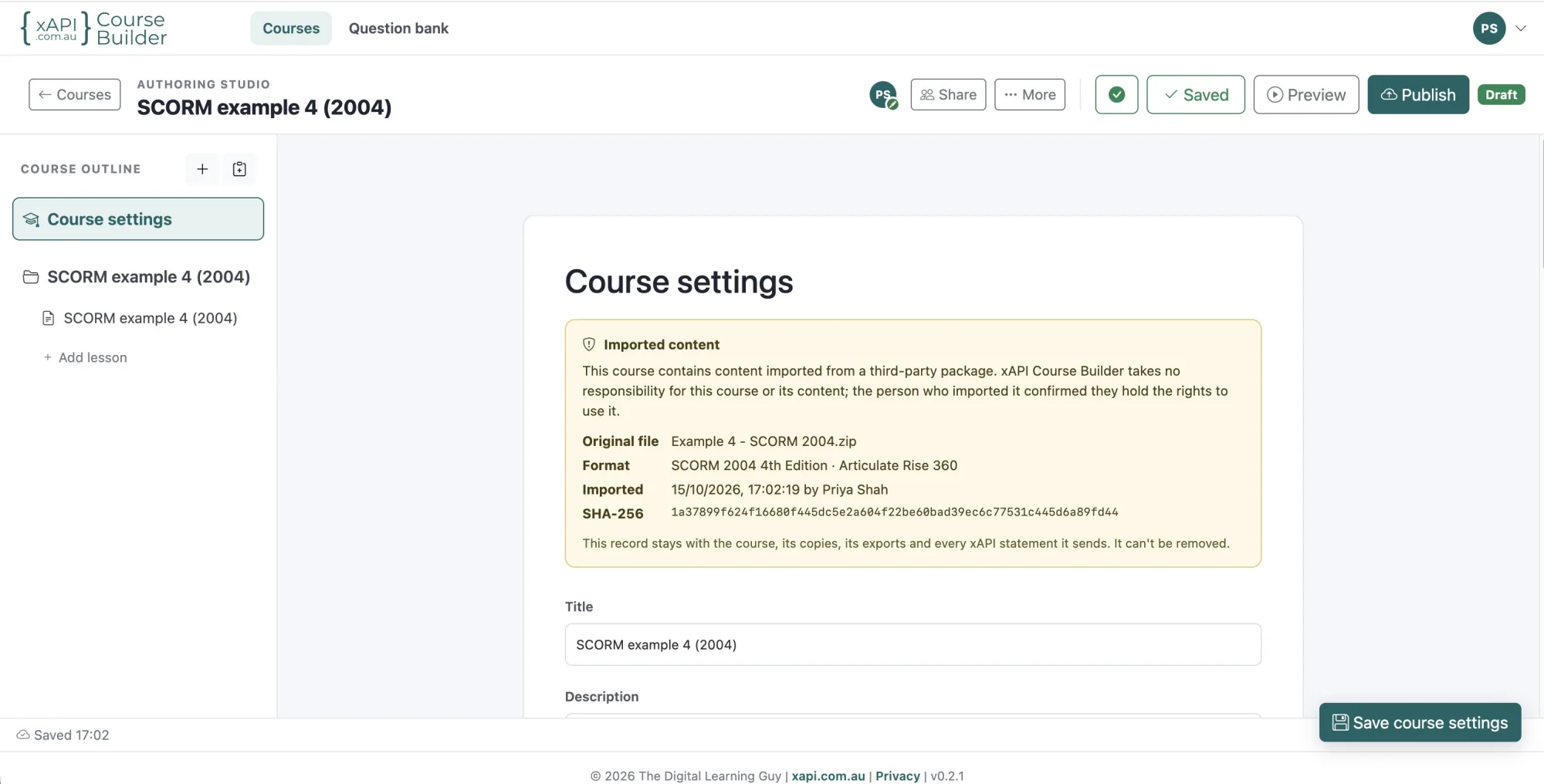
Years of SCORM content doesn't have to stay locked in an old format. Import a SCORM package or a course from another authoring tool, and it arrives as an editable course: update it, improve it, then export it as xAPI or cmi5.
What comes across
Legacy content becomes a course you can edit like any other.
- SCORM packages imported as editable courses*
- Slide-based project files (
.story,.cptand.cptx) from other authoring tools, not just their published output* - Pick the slides you want and turn quizzes into scored assessments
- Text, images and choice questions convert; other interactions are flagged for you to rebuild
- A review step before anything is imported
- A permanent record of where imported content came from
* Only import content you own or have the owner's permission to copy, modify and republish. You confirm this before every import, and you are responsible for how imported content is used.
How SCORM to xAPI conversion works
Upload
Choose the SCORM ZIP or exported course.
Review
Check what was found: pages, media and questions.
Edit
Update and improve the imported course in the studio.
Export
Publish it as an xAPI or cmi5 package.
Questions from your LMS
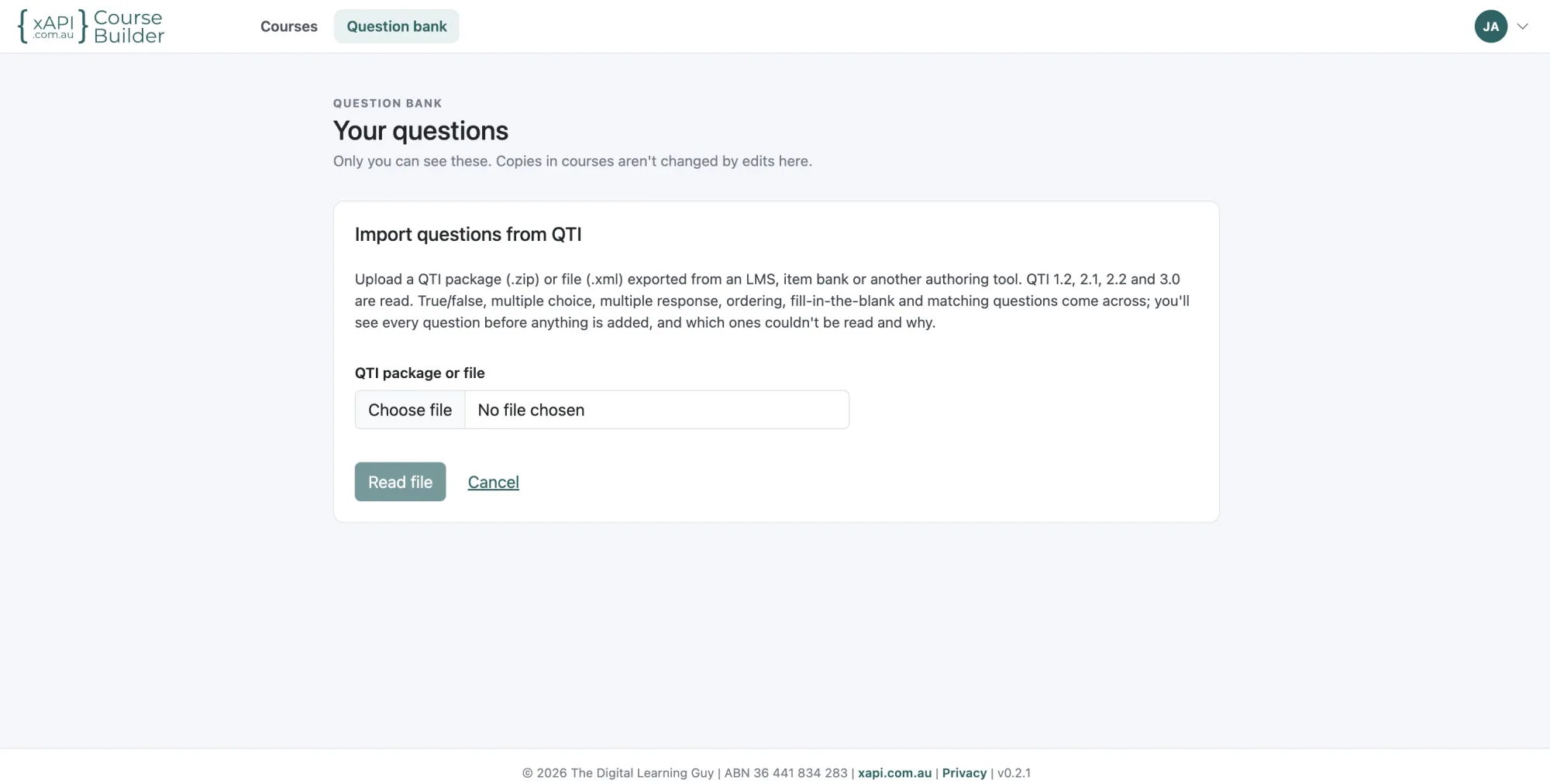
Bring the question banks you already have. Import QTI files straight into your question bank, ready to reuse in any course.
- QTI 1.2, 2.1, 2.2 and 3.0 packages (.zip) or files (.xml)
- True or false, multiple choice, multiple response, ordering, fill-in-the-blank and matching questions
- See every question before it's added, and the reason any couldn't be read
- Keep the file's categories or file them all under one, and tag them in one go
- Questions already in your bank are spotted, so importing again doesn't double up
More detail: converting SCORM to xAPI and importing QTI questions.
Export and delivery
No LMS? No problem.
Publish your course as a standalone website on any web host, tracked straight to your own LRS. If your LMS doesn't support xAPI, open hosted courses from it over LTI 1.3. If it supports cmi5 or xAPI, export a package. However you deliver, every interaction is recorded as xAPI. Many authoring tools treat xAPI as an export option. xAPI Course Builder is designed around it.
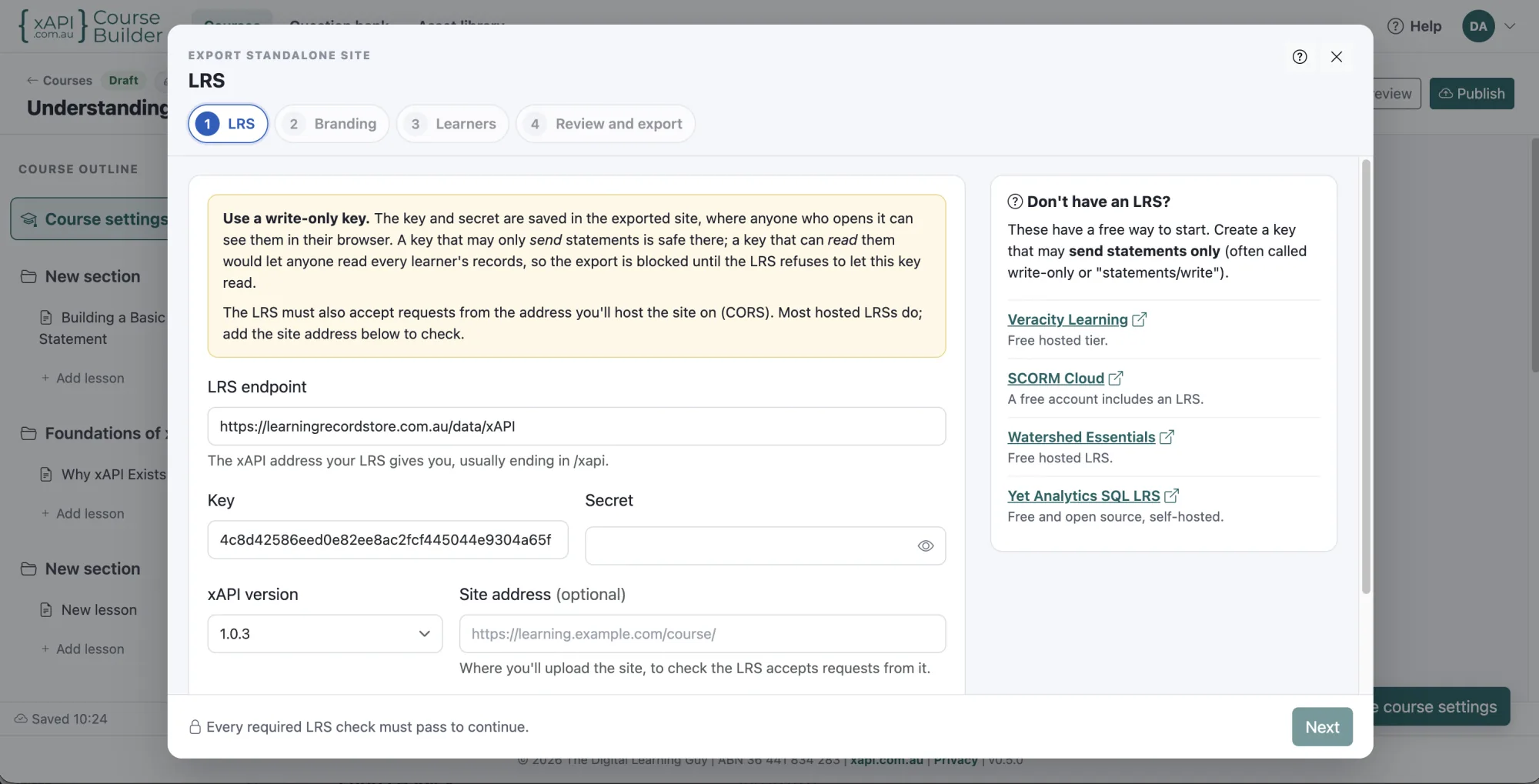
Standalone course site
A whole course website, with no LMS needed.
- A ZIP to unzip onto any web host, at a domain or in a folder
- Your logo, colours and welcome text on the landing page
- Learners give their name and email, with an optional access code and consent tick box
- Statements go from the browser straight to your own LRS
- Checks that your LRS key can send but not read, so learner records stay private
- Learners pick up where they left off, and nothing is lost if the LRS is briefly offline
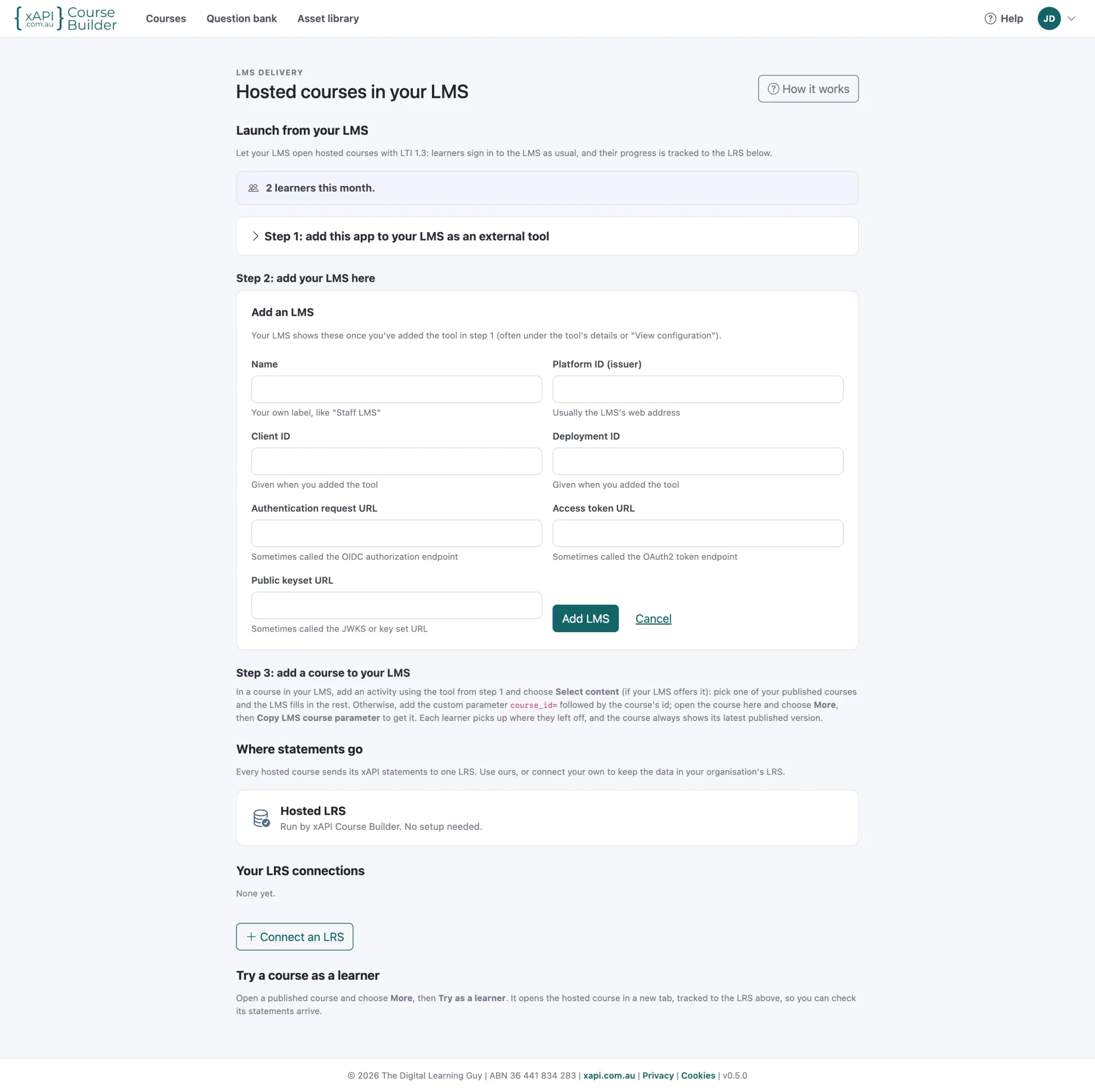
Hosted courses in any LTI 1.3 LMS
For LMSs that don't support xAPI or cmi5: no package to upload, and no SCORM.
- Add xAPI Course Builder to your LMS once as an LTI 1.3 tool, then pick a published course for each activity
- Learners sign in to your LMS as usual, with no account here
- Publish an update and learners get it the next time they open the course
- Scores go to your LMS gradebook
- Full xAPI tracking to our LRS, with nothing to set up, or to your own
- Pro and Team include 20 LMS learners a month; with the LMS add-on, each one after that is A$0.50
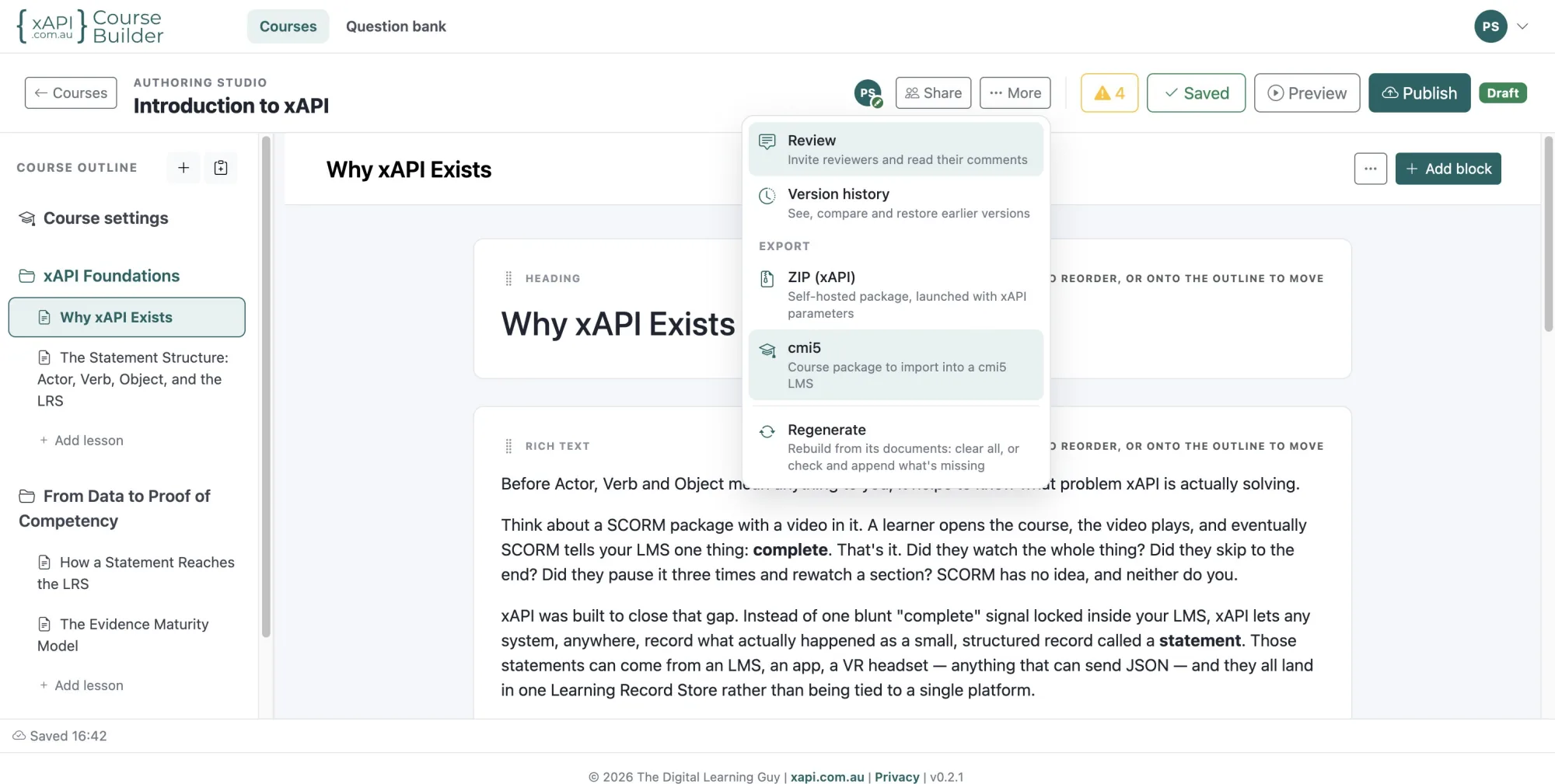
cmi5 and xAPI packages
For LMSs, portals and launch services that support cmi5 or xAPI.
- Immutable published versions with history and restore
- cmi5 package export for cmi5-capable LMSs
- xAPI package export for launch links and portals
- All media packaged inside every export
- Bundled xAPI profile and activity list
- Responsive learner player for desktop, tablet and phone
Built around xAPI, however you deliver
cmi5 package
For LMSs that support cmi5. The LMS launches the course and passes it a short-lived, one-time token, so LRS credentials never appear in the course link.
xAPI package
A self-contained ZIP for launch links, portals and other xAPI-enabled environments that supply the Learning Record Store details at launch.
Runs without our app
Each package includes its own player and all its media, so nothing depends on xAPI Course Builder after export.
Built to the specification
Every statement an exported course generates follows the xAPI specification and a published xAPI profile, so data from different courses compares like for like.
Documented down to the statement
Every export includes a description of the statements each block produces and a list of its activities, so analysts and future systems can read the data without guesswork. In the studio, any block shows the statements it will send before you publish.
Your data, in your LRS
Statements go to the Learning Record Store your organisation chooses. When your LRS is independent of your LMS, you can change LMS and keep your learning history.
More about cmi5 export.
Learning evidence and analytics
See what learners did, not just whether they finished
A completion status tells you who reached the end. It doesn't tell you who understood. When an exported course is launched through your LMS or another xAPI-enabled environment, it generates detailed xAPI statements and sends them to your Learning Record Store.
What many SCORM courses report in practice
- Completion status
completed - Pass or fail
passed - Score
80 - Total time
00:42:10
SCORM can also record interactions, but they stay inside the LMS, in its format, and many LMSs don't report on them.
Statements an exported course can generate every interaction
- Each lesson and chapter a learner opens, and when
experienced - Every answer, including the wrong option they picked
answered - Each decision in a branching scenario, and the ending reached
answered · completed - Each hotspot opened and tour link followed in a 360° image or virtual tour
interacted - Video and audio: plays, pauses, seeks, segments watched, progress
played · seeked - Assessment attempts, scores, pass marks and outcomes
passed · failed - Learner feedback: star ratings and comments
rated · commented - Session start, duration and exit
initialized · terminated
The labels on the right are the standard xAPI verbs, as your LRS will show them. Statements are sent, when the course is launched, to the conformant Learning Record Store your organisation chooses. Every statement follows our published xAPI profile, so your LRS and analysts can see exactly what each one means.
What that evidence helps you do
Find the confusing question
See which distractor most people choose, and fix the content behind it.
Understand judgement
Compare the paths learners take through a branching scenario, not just what they recall.
Improve your video
See where learners rewind, skip or drop off, minute by minute.
Link learning to performance
Combine learning records with other data in your LRS or BI tool to report on capability, not seat time.
How deployment works
How a course gets from here to your learners
Build
Generate a draft with AI, import a SCORM course or start blank.
Review
Send reviewer links, collect feedback and fix accessibility issues.
Publish
Lock a version. Earlier versions stay in the history, ready to restore.
Export
Download an xAPI or cmi5 package, or a standalone course site, with all media inside.
Deliver
Upload it to your LMS, launch it from a portal or launch service, put it on your own website as a standalone course site, or open it as a hosted course from any LTI 1.3 LMS.
Collect evidence
As learners take the course, it sends xAPI statements to your Learning Record Store.
Who does what
| Part | Role |
|---|---|
| xAPI Course Builder | Authoring: create, review, publish and export the course |
| Your LMS or launch service | Delivery: enrols learners, launches the course and manages access |
| Your Learning Record Store | Data: receives and stores xAPI statements, and feeds reporting |
See one for yourself: try an example course, built in xAPI Course Builder and published as a standalone course site. It asks for your name and email so it can record your progress.
LMS doesn't support xAPI or cmi5? If it supports LTI 1.3, open hosted courses from it instead (Pro and Team). Otherwise, a SCORM-to-xAPI bridging service can wrap an xAPI course so a SCORM LMS can launch it, while the statements still go to your Learning Record Store. Ask your LMS administrator what your platform supports.
Why xAPI instead of SCORM
Why choose xAPI and cmi5 over SCORM?
SCORM has been the default e-learning standard for over twenty years. It was designed for a course running in a browser window, talking to the one LMS that launched it.
| Question | SCORM | xAPI | cmi5 |
|---|---|---|---|
| What it is | A packaging and runtime standard for LMS content | A specification for recording learning experiences as statements | An xAPI profile that defines how an LMS launches and tracks xAPI courses |
| Where data is stored | Inside the LMS | In a Learning Record Store | In a Learning Record Store |
| Typical data in practice | Completion, pass or fail, score, time | Detailed interactions, decisions, media use, attempts | xAPI detail, plus standard launch, session and completion rules |
| Data portability | Tied to the LMS's own format | Open format, queryable through a standard API | Open format, queryable through a standard API |
| Launch | LMS only, in a browser | Any environment that provides the LRS details | Standardised LMS launch |
Choose xAPI and cmi5 when you want to
- Analyse what learners did, not just whether they completed
- Keep learning data in a Learning Record Store you control, independent of any one LMS
- Combine learning data with other business data
- Build on current standards rather than legacy ones
Read more: what is xAPI?, what is cmi5? and xAPI vs SCORM.
Who it's for
Built for the people who build learning
Instructional designers and e-learning developers
Produce first drafts in minutes and spend your time on design, not data entry.
L&D and training teams
Create staff training, onboarding and compliance training at scale, and review it together.
Compliance and safety training owners
Go beyond "completed" to evidence of what people answered and decided.
Learning technologists and LMS administrators
Standards-based xAPI and cmi5 packages, documented down to the statement.
Training providers and consultants
Build for multiple clients and deliver portable packages to any compatible LMS.
Teams moving off SCORM
Import existing courses and republish them on open standards.
Pricing
Start free, upgrade when you need more
Every plan exports xAPI and cmi5 packages and standalone course sites, and includes review and collaboration. Pay monthly, or yearly and get two months free.
Free
A$0
- 2 courses
- 1 AI-generated course
- Uploads up to 25 MB a file
- xAPI, cmi5 and standalone site export, review and collaboration
- No credit card needed
Pro
A$49 a month
or A$490 a year (two months free)
- Unlimited courses
- 15 AI generation runs a month, with top-ups when you need more
- Regenerate a course when your source changes
- Uploads up to 100 MB a file
- Hosted courses in any LTI 1.3 LMS, with 20 learners a month
- Everything in Free
Team
A$59 per author a month
or A$590 per author a year (two months free) · 3 to 100 authors
- Everything in Pro for every author
- Courses shared and co-edited across the team
- AI runs pooled across the team
- Add and remove authors yourself from Manage team
Prices are in Australian dollars. Start a team from Plan and billing once you've signed up. For more than 100 authors, or to pay by invoice, talk to us. Compare the plans in detail.
FAQ
Frequently asked questions
What is xAPI Course Builder?
xAPI Course Builder is an AI course authoring platform. It generates online courses from your documents, links and briefs, lets you edit and review them in a web-based studio, and exports them as xAPI or cmi5 packages for use in your own LMS and Learning Record Store (LRS).
How does AI course generation work?
You add source material: files, PDFs, web links, online documents, video links or a written brief. The AI proposes an outline of chapters and lessons for you to edit, then writes the lessons, questions and interactions from your material. Everything it produces is editable.
What is xAPI?
xAPI (the Experience API, also called Tin Can) is an open e-learning specification for recording learning experiences as statements in the form "actor, verb, object", such as "Priya answered Question 3". Statements are stored in a Learning Record Store. The current version, xAPI 2.0, is published as IEEE standard 9274.1.1.
What is cmi5?
cmi5 is an xAPI profile that defines how an LMS launches an xAPI course, authenticates it, and records sessions, completion and pass or fail. It combines the detailed tracking of xAPI with the predictable LMS launch that SCORM provided.
What is a Learning Record Store (LRS)?
A Learning Record Store is a system that receives, stores and returns xAPI statements. It can be stand-alone or built into an LMS. Reporting and analytics tools read learning data from the LRS.
How is xAPI different from SCORM?
SCORM runs a course in a browser and stores a limited set of data inside the LMS that launched it. xAPI records detailed learning activity as statements in a Learning Record Store, in an open format that other systems can query, and isn't tied to a single LMS.
Why use xAPI instead of SCORM?
Use xAPI when you need more than completion and a score: for example, which answers learners chose, how they handled a scenario or how they watched a video. Because the data lives in a Learning Record Store you choose, it stays portable if you change LMS.
What data can courses built with xAPI Course Builder capture?
When launched in an xAPI-enabled environment, exported courses generate statements for lessons opened, every answer (including incorrect choices), branching-scenario decisions, video and audio interactions, assessment attempts and scores, learner ratings and comments, and session start, duration and exit.
Does xAPI Course Builder track learners or store their data?
Not for exported courses. xAPI Course Builder is an authoring tool, not an LMS. An exported course is tracked only when it's launched through your LMS, cmi5 launch service, portal, website or other xAPI-enabled environment, and the statements go to your organisation's Learning Record Store. Hosted courses opened from an LTI 1.3 LMS are different: they run from xAPI Course Builder, and their statements go to our Learning Record Store by default, or to your own if you connect it.
How are exported courses deployed?
Download a cmi5 package and upload it to a cmi5-capable LMS, or use the xAPI package with a launch link, portal or other environment that provides the Learning Record Store details at launch. Each package contains its own player and media and doesn't depend on xAPI Course Builder.
What role does an LMS play?
The LMS manages learners, enrolments and course launches. With cmi5, the LMS launches the course and gives it secure, temporary access to the Learning Record Store.
What role does an LRS play?
The Learning Record Store receives and stores the xAPI statements the course generates, and makes them available to reporting, dashboards and BI tools.
Can I convert SCORM courses to xAPI?
Yes. Import a SCORM package or a course from another authoring tool and it becomes an editable course. Review and update it, then export it as xAPI or cmi5. Only import content you own or have permission to adapt.
Can I import questions from my LMS or item bank?
Yes. Export your questions as QTI (versions 1.2, 2.1, 2.2 and 3.0 are supported) and import the package or file into your question bank. True or false, multiple choice, multiple response, ordering, fill-in-the-blank and matching questions come across, and you review every question before it's added. Questions the bank can't hold, such as essays or image hotspots, are listed with the reason.
Can I launch courses from an LMS that supports LTI 1.3?
Yes, on the Pro and Team plans. Add xAPI Course Builder to your LMS as an LTI 1.3 tool, then choose a published course for each activity. Learners sign in to your LMS as usual and always get the latest published version, scores go to the LMS gradebook, and xAPI statements go to our Learning Record Store or your own. Pro and Team include 20 LMS learners a month. With the LMS add-on, each learner after that costs A$0.50, billed monthly.
My LMS doesn't support xAPI or cmi5. What should I do?
You still have options. If your LMS supports LTI 1.3, open hosted courses from it: there's no package to upload, learners sign in to the LMS as usual, scores go to its gradebook and full xAPI tracking goes to a Learning Record Store. Otherwise, ask your LMS provider: many LMSs now support xAPI or cmi5, sometimes as a setting or add-on. If yours doesn't, a SCORM-to-xAPI bridging service such as xAPI Delegate can wrap the course in a SCORM package so your LMS can launch it, while the xAPI statements still go to your Learning Record Store. You can also launch the xAPI package from a portal, intranet page or launch link that supplies the Learning Record Store details. In the long term, a cmi5-capable LMS gives you a standard launch with full xAPI tracking.
Are the courses accessible?
The learner player is built to WCAG 2.2 AA, with keyboard navigation, screen-reader support and contrast-checked themes. An accessibility checker in the studio flags content issues, such as missing alt text, before you publish.
Who is xAPI Course Builder for?
Instructional designers, e-learning developers, L&D and compliance teams, training providers and learning technologists who want to create courses quickly with AI and deliver them on the open xAPI and cmi5 standards.
Is there a free plan?
Yes. The Free plan includes two courses and one AI-generated course, with xAPI and cmi5 export, review and collaboration. No credit card is needed. Paid plans for individuals and teams add unlimited courses and monthly AI generation.
Who makes xAPI Course Builder?
xAPI Course Builder is made in Australia by The Digital Learning Guy (ABN 36 441 834 283), the business behind xAPI.com.au.
Contact
Talk to us
Bringing a whole team, wondering whether it fits how you work, or stuck on something? Send us a message and we'll reply by email.
Build your first AI‑generated course today
Start with the material you already have. Turn it into an interactive course, then export it as xAPI or cmi5 for your LMS.